Monday, March 4, 2013

Optimizing Phpfox - Tip #2

The feed seems to be the most resource hungry feature so far. If Timeline is enabled , when going to a profile the script needs to find which years have content so it can display the Timeline years block; this can span up to 20 queries to the database in some cases and while it makes proper use of indexes and conditions this is a load we can save in 2 ways:

1) Disable Timeline
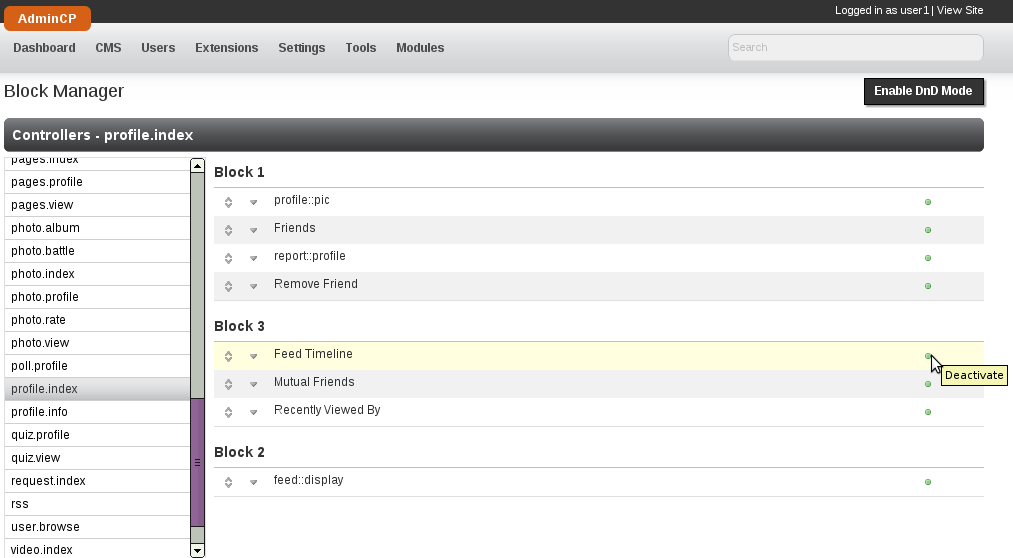
2) Disable the Time block, this is perhaps the most feasible option, if you have timeline enabled it must be for a reason. To disable this specific block go to AdminCP -> CMS -> Block Manager, then click on profile.index and disable "Feed Timeline":


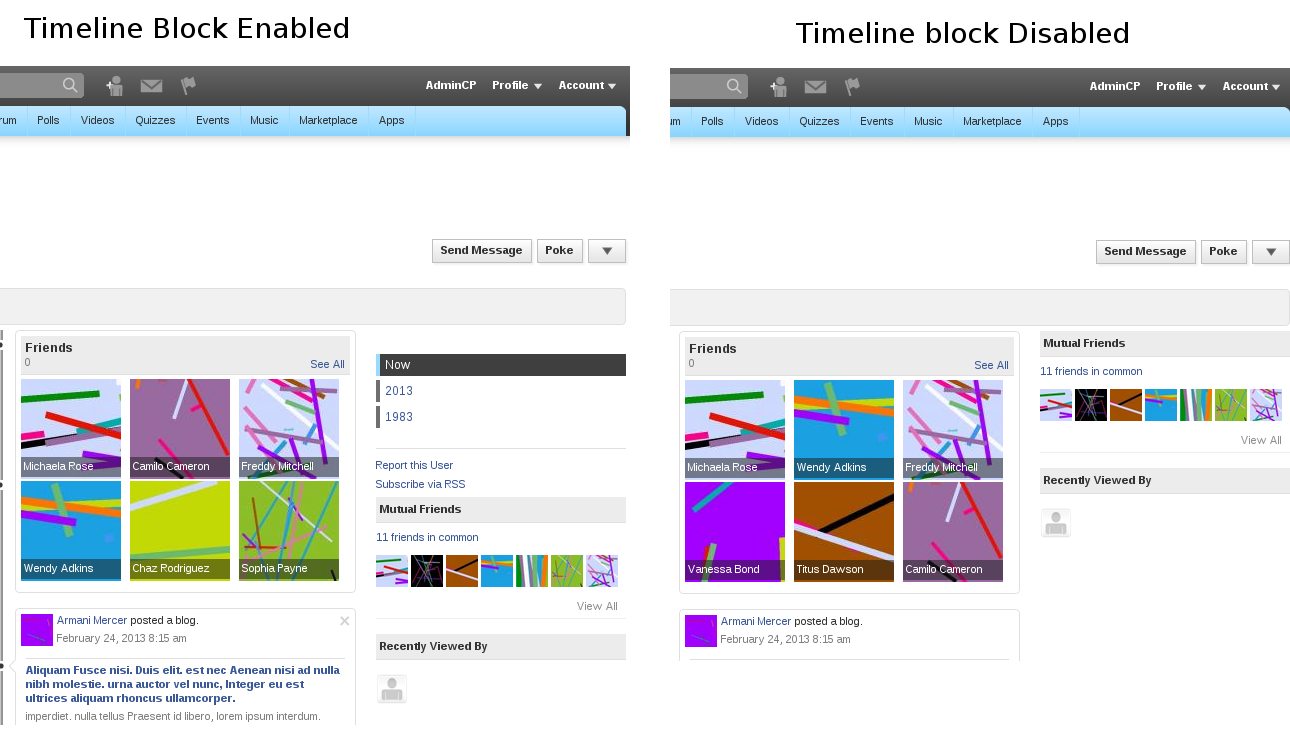
 you will keep the timeline look but the year selector wont be there


With this small change your site will be using a lot less resources and it will contribute to keeping it more stable and efficient.

Note: In case you are wondering, the queries that come from this block do in fact get cached, one cache file per user, but the cache file (specific to a user) is deleted after that user posts something that creates a feed.

Friday, March 1, 2013

Optimizing Phpfox - Tip #1

Lately I've been running into little "tricks" that can help a phpfox site perform better, I will try to add them here as I find them.
Today I have perhaps the most important one that I have seen so far, it came after debugging this database query:

explain extended SELECT feed.*, f.friend_id AS is_friend, 
apps.app_title,  u.user_id, u.profile_page_id, 
u.server_id AS user_server_id, u.user_name, u.full_name, 
u.gender, u.user_image, u.is_invisible, u.user_group_id, 
u.language_id

FROM phpfox_feed AS feed
JOIN phpfox_user AS u
        ON(u.user_id = feed.user_id)
LEFT JOIN phpfox_friend AS f
        ON(f.user_id = feed.user_id 
AND f.friend_user_id = 1)
LEFT JOIN phpfox_app AS apps

        ON(apps.app_id = feed.app_id)


WHERE feed.time_stamp > '0' AND feed.feed_reference = 0
GROUP BY feed.feed_id
ORDER BY feed.time_update DESC
LIMIT 10
Why is it such a naughty query? well the feed table is the main table here, but the only two conditions to filter it are the time_stamp and the feed_reference. Most of the time feed_reference will be 0 so this isn't a great filter, and time_stamp > 0 is trivial, in fact ignored by MySQL. So, many times this will run through the entire feed table, which is very likely to host hundreds of thousands of records.

Luckily we have a setting in the AdminCP that can help with this, "Feed Limit (Days)", this tiny little setting will help you greatly to improve performance. What it does is to limit the feeds to a number of days in the past. One way to find a good value for this is to do this check, add a photo to the feed or something that you can easily identify, come tomorrow and look for that feed, if you cannot find it in the first page (before the ajax load ) then you think that 1 day is enough, but for safety check the next page of feeds, if you cannot find it in the 3d page then my advise is to set this to 3 so it looks a maximum of 3 days in the past.

Hope it helps

Friday, February 8, 2013

Optimization of Phpfox: MySQL

Today  Yesterday I landed in a bug report that mentioned full table scans, in my younger years (ok, 5 years ago) I was very interested in databases and even took a workshop in Mexico by MySQL to become a DBA so I dutifully began testing.

The first thing I did was to set up a local copy of Phpfox 5.3.0 RC1 (not yet released) with content (users, blogs, friends,...), then enabled the slow_query_log and set the long_query_time to 2, because this is a local server with no traffic I assumed a safe bet that no query would take longer than 2 seconds. Then I enabled log-queries-not-using-indexes to capture those in the slow query log. Then using the script I was able to find queries that could be optimized (theoretically at least).

There were indeed some queries using union and joins that could be optimized (large sites will likely see a performance increase in 5.3.0 RC1).

I do have to point out a couple of things:
First, some queries are being logged but they are meant to scan the full table, for example when getting all the user groups we want all the records in that table, using indexes would not improve performance because we want everything in that table, intentionally this table is typically very small, it defaults to 5 records and in normal circumstances shouldn't grow beyond 10 rows.
Second, In some cases, MySQL seemed to not want to use a specific index, for example with this query:

SELECT COUNT(*)
FROM phpfox_user AS u
JOIN phpfox_user_field AS ufield
ON (ufield.user_id = u.user_id)
WHERE u.status_id = 0 AND u.view_id = 0
If you run that query with explain you will see that MySQL had many indexes to use but chose none, and in my test it did run a full table scan. So to help in this situation we implemented the function forceIndex() in the DBA library, this allowed us to tell MySQL which index to use and after rewriting the query we saved on fetching rows, (in the one that I have just rewritten in the feed there is a filtering improvement of 45.31%)  which translates in a performance improvement.

Third, we made sure that whenever the developer queries for getSlaveField or getField the database library adds a LIMIT 1 if it was not added by the developer, we saw a tiny tiny performance after this small change.

Fourth, I also found some strange behavior in mysql where it would log a query from a 'derived' table and not use any indexes for that sub-query, but taking the sub-query out and testing it by itself did use the index, in this case force index did not help, for what is worth, this only happened in the main Blog section when logged in as an administrator.

Fifth, in one occasion after optimizing the query (meaning it did not get logged in the slow query log) it took longer for mysql to fetch the results, we opted for 'un-optimizing' the query since the tangible benefits outweighed the theoretical ones.

The improvements added affect sections frequently reached like the Browse Members and Home (after logging in, where the news feed is).

For developers: here is sample code using the forceIndex function:

$iCnt = $this->database()
        ->from($this->_sTable, 'u')
        ->forceIndex('status_id')
        ->join(Phpfox::getT('user_field'), 'ufield', 'ufield.user_id = u.user_id')
        ->where($this->_aConditions)
        ->execute('getSlaveField');
There surely are queries still to fix, if you find them please let us know, we will continue looking for them but must also attend to other bug reports.
Monday, January 21, 2013

Tip: Time in JS

I recently forgot one of the (implicit) primers in JS, once you instantiate a Date() object you will continue getting the time from when you instantiated it, for example:
// We instantiate the Date object
// at this time it has a date that will never change
var oDate = new Date();
console.log( oDate.getTime() );
setTimeout( function(){
    console.log( oDate.getTime() );
}, 5000);
It will output the same value in line 4 and 6. I just mention this in case I myself run into this problem again. one easy easy fix is to instantiate it on the fly:
var oDate = new Date();
console.log( oDate.getTime() );
setTimeout( function(){
    console.log( new Date().getTime() );
}, 5000);

Thursday, November 15, 2012

Overloading methods in Php: __call()

Just for the record I know that php does not support multiple classes to be extended and today while talking to a dear friend I thought this would work to sort of workaround this, and it did, for most cases I dont think this is very useful  but if you're in college this might come in handy for a homework or project:


<?php

class Mother
{ 
  public function func2() { return 'Mother knows best'; }
}

class Father
{
  private $_aClasses;
  public function __construct()
    $this->_aClasses = array( 'Mother' => new Mother); 
  }

  public function func1() { return 'func1 from Father'; }

  public function __call($sName, $aArguments)
  {
    foreach ($this->_aClasses as $oObj)
    {
      if (method_exists($oObj, $sName))
        echo $oObj->$sName(); 
      }
      else 
        var_dump($oObj); 
      }
    }
  }
}

$oF = new Father;
$oF->func2();
?>


This outputs "Mother knows best" even thought Father doesnt have a function func2().

Friday, June 29, 2012

Phpfox Developers: Correct way of sending mail (multiple languages)

Well we got a bug report today that at first seemed intimidating, the case was that in some mails being sent the script would not take into account the language of the receiver if it was a registered user. The first approach was to open the callback for that one case and scenario and fix it there, 3 lines of code edited no big deal, the problem is that it was a callback, meaning every module implemented, so 3 lines of code times 61 was too much to do by hand, luckily we have a built in method to change the language just for one phrase and the fix turned out to be site wide and implemented in less than 1 minute, here's the recap:

This code is wrong because it will not take the target user's language into account
Phpfox::getLib('mail')->to($aRow['user_id'])
->subject(Phpfox::getPhrase('module.var'))
->message(Phpfox::getPhrase('module.var'))

This next is correct:
Phpfox::getLib('mail')->to($aRow['user_id'])
->subject(array('module.var'))
->message(array('module.var'))

That is basically it, since you are passing the user_id in the ->to() function the mail library will pick up the language for that user, and by passing an array instead of the actual phrase the mail library will get the correct phrase, you can also include an array of parameters if you like as a second element in the array:

Phpfox::getLib('mail')->to($aRow['user_id'])
->subject(array('module.var', array('param1' => 'val1')))
->message(array('module.var', array('param2' => 'val2')))

and it will run the replacements as if you had done a getPhrase. Our fix was to Replace In Files all
 ->subject(Phpfox::getPhrase
with
->subject(array
and same for
->message.

Thursday, June 28, 2012

Backing up


Backing up is so important that every successful website has at least one person dedicated to this task.
If you have not yet defined your back up policy this post will help you.

Database Backups


There are specific tools for each database manager that you have (a database manager can be "MySQL", "PostgreSQL", "MSSQL"...). For now I will talk about the two kinds of backups:

Full Snapshot

This kind of backup takes your entire database and stores it in a flat file with instructions to delete tables when imported. It is a real copy of your database and is useful when moving your site to a new server, it also serves as the base for an incremental backup.

In MySQL there are two important tools that generate full snapshots: mysqldump and mysqlhotcopy. Since InnoDB is the default engine since MySQL 5.5 let me just give a quick introduction to mysqldump since mysqlhotcopy is meant for MyIsam tables. Keep in mind that these are server tools and you would execute them via console (SSH possibly).

mysqldump receives a number of parameters, not all are mandatory but the following will give you a full database dump that overwrites (deletes and re-creates) your existing data:

$ mysqldump --compact [db-name]

Another way of backing up your database is by directly copying the files. These files depend on the type of tables that you have and more detailed information can be found in the MySQL site.

Incremental Backup


Given a Full Snapshot backup you can store only the changes since the full backup, reducing the space and processing time needed, in mysql this is done using the binlog and not by chance this log is also used in Replication.

Restoring from a binary log file is very easy, for example:

$ mysqlbinlog binlogfile | mysql -u root -p

You can also export your binary log file to a flat file:

$ mysqlbinlog binlogfile > temporalfile.sql

File Backups


A full backup (tar or zip are very common) is also the easiest way to go, this however can lead to much larger storage requirements.


Generally speaking your files do not change that much, you upload an image and it will stay there, you will not update it and often times it will not be deleted until the end of time, a hard disk failure is also rare and if you do not manage your server chances are there are redundant backups (think RAID), I do not mean to ignore this kind of backups but in general terms a hard disk failure is easily mitigated up to a certain size.

The following command will compress the folder myFolder into the file myArchive.tar.gz
$ tar -zcf myArchive.tar.gz myFolder

The 'z' means to use GZip, the 'c' means to create an archive and the 'f' means to write it to a file.
Of course you also need to extract an archive, the following command will do just that:
$ tar -zxf myArchive.tar.gz

The 'x' parameter means to extract.

Another approach to backing up flat files is to use a subversion server, this is similar to the incremental backup and you can actually backup the files that make up for your database in SVN (although this is rather unconventional).