Thursday, May 15, 2014

Nice linux command to ignore lots of files

I've been working with git from command line lately and in this particular project we have a folder to store cache files (we use other cache stores in production) which gets crowded really quickly and doing a git status was not pleasant at all, here is a screenshot from inside that folder (file/cache):
at the end of the list it would show the files I was interested in but still... A couple of minutes later I came up with this one liner to remove all of these files:


git status | egrep cache | tr -s ' ' | cut -d ' ' -f 2 | xargs git rm --cached $1;

Let me explain why it works, the first part (git status) runs the normal git status command but this one is cluttered with extra information, I just want the files that belong to the cache folder so a simple egrep cache filters the lines that do not contain the word "cache". Now, I wasn't sure if those were spaces or tab characters so to make it more universal I decided to remove duplicated spaces with tr -s ' ', it does not remove all spaces, just the duplicated ones so '    ' becomes ' '. The next part is the cut -d ' ' -f 2 which basically extracts the information from column 2, and finally pass that to git rm --cached 

Note that all of these commands are "glued" with the pipe character ( this one: | ) which takes the output from the previous command and passes it as a param to the next command.

Thursday, May 1, 2014

Password Cracking with Hashcat

Disclaimer: Anything posted here is in the spirits of education, and education only. I am not responsible for what you do with the information here posted.

Ever since I attended Siren's talk on DDoS (she totally rocks btw!) I got -once again- interested in security and today I undusted an old proyect I worked on and tried to log in, no luck try after try until eventually I thought "well I can of course just reset it... or have some fun and crack it", after all, it uses md5 and its been a while since md5 was first cracked... shouldn't be too hard to find my old password right? well sure there are tools but the processing power available to me still makes it an arduous task... to make things worse the hashing format isn't plain md5, its a triple md5-d password, so the process is not straightforward.

Enter Hashcat, a very robust tool to crack passwords, their documentation wasn't dummy-proof and even after reading examples, their wiki and the help command I couldn't get anything working, fortunately "Xanadrel" in IRC helped me through and shortly after I got a better understanding of how it works. So, fair warning, I am not a cracker, Im not a super smart guy, I couldn't even get this to work on my own in the first try. What Im sharing here is what I learned today.

Password cracking is slow...

Im doing this in a virtual machine with 4 cores available and 3.3Ghz, my original password would take 16hrs assuming Im right and the last 2 characters are digits. Im sure putting more cores to work would highly improve the processing time but Im not going to do that.

Mask

The mask tells the format of the original password and is great if we know something about the password we are trying to crack like the length and the type of characters in the password. If we know that in a certain position of the password there is a number, we can tell Hashcat about it and the time it takes to find the password is reduced. Here is a nice table with the replacements:

What we knowReplace with
its a number?d
its a upper case letter?u
its an lower case letter?l
its a symbol like <space>!"#$%&'()*+,-./:;<=>?@[\]^_`{|}~ ?s
any of the cases above?a

Here are some examples of masks for specific passwords:
PasswordMask
14705?d?d?d?d?d
azctqq?l?l?l?l?l?l
1s5f7u?d?l?d?l?d?l
! 4L?s?s?d?u

Attack Types

Since we want to make this right, and we know something about the password, we can define a specific type of attack, this is the algorithm that Hashcat will use to find the password. Since we know something about the original password we can use the mask and because of this we need to specify a "brute force" attack, in reality this isn't a brute force attack but we need to define it as such (this was explained to me by Xanadrel). 
Depending on your operating system the way to pass params varies, since Im in linux this is how we pass the param for brute force:

-a 3

I believe in windows you need to use the long format.

Hash Types

There are many combinations to using md5, they call this "hash types", in this case since we know the password is a triple md5-d hash, we can find that in the references (run hashcat with the param --help and find the "References" section) with the number 3500 so we would add this param to the equation:

-m 3500

Increment

Hashcat assumes that if we set a mask of 7 characters we also want to check for passwords with 6 characters and less, if we know the exact length or even an approximate length it will be very useful to tell hc about it, we do this with the pm-min and pm-max params:

--pm-min=6 --pm-max=7

The Recipe

Hashcat reads hashes from a file, so make sure to put your hash in a file, it doesnt need anything special or fancy, just a one line with your hash and you're good to go, lets say you named this file "to_crack.txt", the final command would look like this:

shell> ./hashcat-cli64.bin -m 3500 -a 3 -show --pw-min=7 --pw-max=7 to_crack.txt ?a?a?a?a?a?d?d


I didn't need any salts but if you do, you add them to the end of your hash in your hash file so it would look like this:


ed1791de507c63335e735bd6ce7cd7bb:salt

The format is:
<hash>:<salt>

(One per line)

The output isn't all bells and whistles so you might miss where it says that it found your password, just look for the message "All hashes have been recovered" and above it you will find the hash and the password.

So there you have it, hope this helps you understand a bit how this magic tool works. If you have any improvements or comments in general feel free to post in the comments.

mysqldump: table doesn't exist

Today I needed to dump a database, nothing special, until mysql dump growled a "table <x> doesn't exist when using LOCK TABLES", ran a check
~$ mysqlcheck -udb_user -p database_name
but everything showed up fine... then I thought "well lets not lock it...", so this worked for me:
~$ mysqldump --skip-comments --add-drop-table --skip-lock-tables --user=my_user --password=my_password database_name >> db.sql
This database in particular was imported by copying files, I fixed the permissions and owner and it is working fine otherwise so I don't know what could be causing this problem which is why I dont count this as a "fix" but just a workaround, wiser folks may understand better what is happening and enlighten me.

Sunday, January 26, 2014

MongoDB Noncopyable error

I was fiddling today with a C++ spaghetti and ran into this error:
/usr/include/boost/noncopyable.hpp|27|error: ‘boost::noncopyable_::noncopyable::noncopyable(const boost::noncopyable_::noncopyable&)’ is private
What it comes down to is that the mongo::DBClientConnection cannot be copied, we have to pass it by reference, like this:
void create_connection()
{
    mongo::DBClientConnection c;
    c.connect("localhost");
    do_something(c);
}

void do_something(mongo::DBClientConnection & c)
{
    // do something with the connection
}

Friday, December 20, 2013

Random Characters in NodeJS

Quick example on how to generate random characters in NodeJS
var crypto = require('crypto');
var randomChars = crypto.randomBytes(50).toString('base64');
That makes a synchronous call to randomBytes, so keep that in mind. If you want asynchronous then pass a second param to randomBytes:
var crypto = require('crypto');
crypto.randomBytes(70, function(err, buf){
 console.log(buf.toString('base64'));
});
more info can be found here

Friday, September 13, 2013

Recently (version 3.6) we moved all JS files to the end of <body>, this improves performance but there are some cases where you as a developer need to put JS files in <head>, in 3.7 we are introducing a way to do this, from a controller you can now do this:

<?php
$this->template()->setHeader('head', array(
    'somefile.js' => 'static_script',
    'otherfile.js' => 'style_script'
));
And it will be loaded in the head. Notice that the difference is the first param when calling ->setHeader.

Monday, March 4, 2013

Optimizing Phpfox - Tip #2

The feed seems to be the most resource hungry feature so far. If Timeline is enabled , when going to a profile the script needs to find which years have content so it can display the Timeline years block; this can span up to 20 queries to the database in some cases and while it makes proper use of indexes and conditions this is a load we can save in 2 ways:

1) Disable Timeline
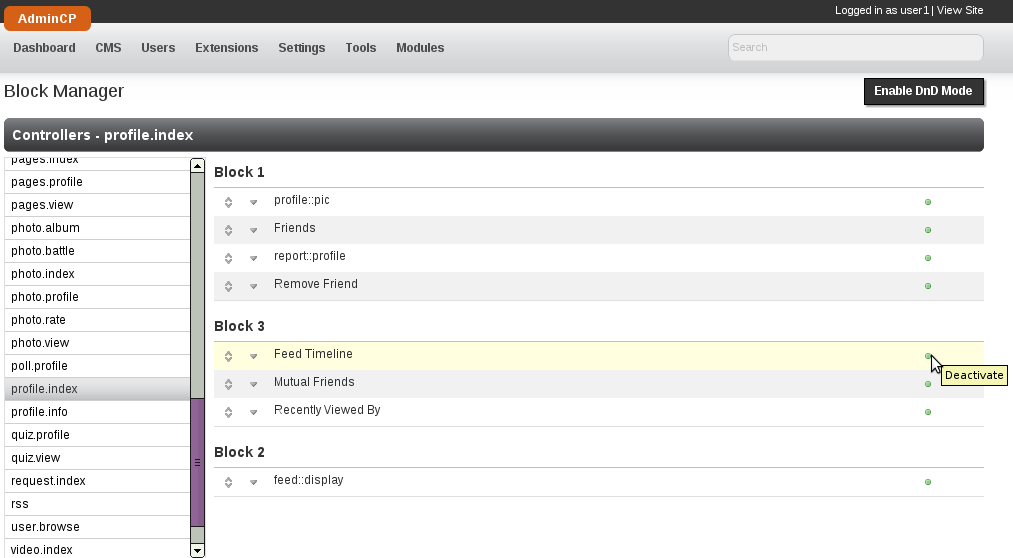
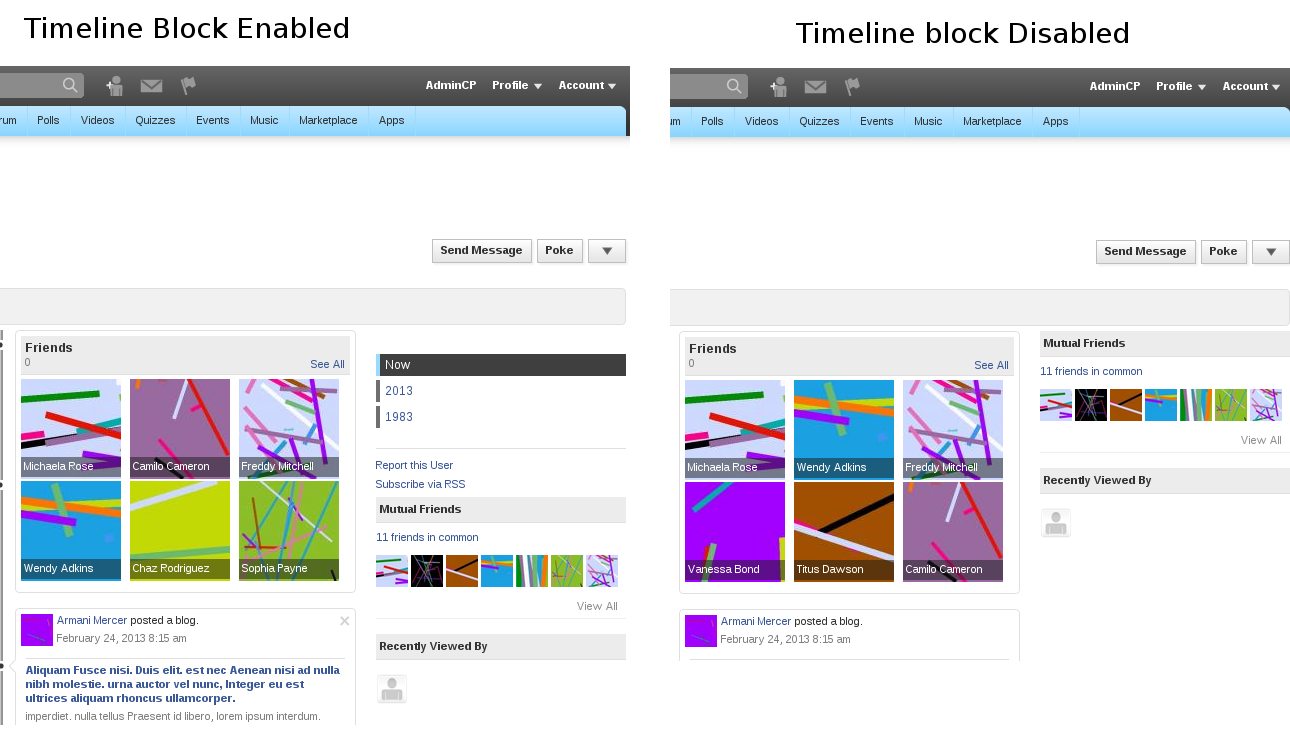
2) Disable the Time block, this is perhaps the most feasible option, if you have timeline enabled it must be for a reason. To disable this specific block go to AdminCP -> CMS -> Block Manager, then click on profile.index and disable "Feed Timeline":


 you will keep the timeline look but the year selector wont be there


With this small change your site will be using a lot less resources and it will contribute to keeping it more stable and efficient.

Note: In case you are wondering, the queries that come from this block do in fact get cached, one cache file per user, but the cache file (specific to a user) is deleted after that user posts something that creates a feed.

Friday, March 1, 2013

Optimizing Phpfox - Tip #1

Lately I've been running into little "tricks" that can help a phpfox site perform better, I will try to add them here as I find them.
Today I have perhaps the most important one that I have seen so far, it came after debugging this database query:

explain extended SELECT feed.*, f.friend_id AS is_friend, 
apps.app_title,  u.user_id, u.profile_page_id, 
u.server_id AS user_server_id, u.user_name, u.full_name, 
u.gender, u.user_image, u.is_invisible, u.user_group_id, 
u.language_id

FROM phpfox_feed AS feed
JOIN phpfox_user AS u
        ON(u.user_id = feed.user_id)
LEFT JOIN phpfox_friend AS f
        ON(f.user_id = feed.user_id 
AND f.friend_user_id = 1)
LEFT JOIN phpfox_app AS apps

        ON(apps.app_id = feed.app_id)


WHERE feed.time_stamp > '0' AND feed.feed_reference = 0
GROUP BY feed.feed_id
ORDER BY feed.time_update DESC
LIMIT 10
Why is it such a naughty query? well the feed table is the main table here, but the only two conditions to filter it are the time_stamp and the feed_reference. Most of the time feed_reference will be 0 so this isn't a great filter, and time_stamp > 0 is trivial, in fact ignored by MySQL. So, many times this will run through the entire feed table, which is very likely to host hundreds of thousands of records.

Luckily we have a setting in the AdminCP that can help with this, "Feed Limit (Days)", this tiny little setting will help you greatly to improve performance. What it does is to limit the feeds to a number of days in the past. One way to find a good value for this is to do this check, add a photo to the feed or something that you can easily identify, come tomorrow and look for that feed, if you cannot find it in the first page (before the ajax load ) then you think that 1 day is enough, but for safety check the next page of feeds, if you cannot find it in the 3d page then my advise is to set this to 3 so it looks a maximum of 3 days in the past.

Hope it helps

Friday, February 8, 2013

Optimization of Phpfox: MySQL

Today  Yesterday I landed in a bug report that mentioned full table scans, in my younger years (ok, 5 years ago) I was very interested in databases and even took a workshop in Mexico by MySQL to become a DBA so I dutifully began testing.

The first thing I did was to set up a local copy of Phpfox 5.3.0 RC1 (not yet released) with content (users, blogs, friends,...), then enabled the slow_query_log and set the long_query_time to 2, because this is a local server with no traffic I assumed a safe bet that no query would take longer than 2 seconds. Then I enabled log-queries-not-using-indexes to capture those in the slow query log. Then using the script I was able to find queries that could be optimized (theoretically at least).

There were indeed some queries using union and joins that could be optimized (large sites will likely see a performance increase in 5.3.0 RC1).

I do have to point out a couple of things:
First, some queries are being logged but they are meant to scan the full table, for example when getting all the user groups we want all the records in that table, using indexes would not improve performance because we want everything in that table, intentionally this table is typically very small, it defaults to 5 records and in normal circumstances shouldn't grow beyond 10 rows.
Second, In some cases, MySQL seemed to not want to use a specific index, for example with this query:

SELECT COUNT(*)
FROM phpfox_user AS u
JOIN phpfox_user_field AS ufield
ON (ufield.user_id = u.user_id)
WHERE u.status_id = 0 AND u.view_id = 0
If you run that query with explain you will see that MySQL had many indexes to use but chose none, and in my test it did run a full table scan. So to help in this situation we implemented the function forceIndex() in the DBA library, this allowed us to tell MySQL which index to use and after rewriting the query we saved on fetching rows, (in the one that I have just rewritten in the feed there is a filtering improvement of 45.31%)  which translates in a performance improvement.

Third, we made sure that whenever the developer queries for getSlaveField or getField the database library adds a LIMIT 1 if it was not added by the developer, we saw a tiny tiny performance after this small change.

Fourth, I also found some strange behavior in mysql where it would log a query from a 'derived' table and not use any indexes for that sub-query, but taking the sub-query out and testing it by itself did use the index, in this case force index did not help, for what is worth, this only happened in the main Blog section when logged in as an administrator.

Fifth, in one occasion after optimizing the query (meaning it did not get logged in the slow query log) it took longer for mysql to fetch the results, we opted for 'un-optimizing' the query since the tangible benefits outweighed the theoretical ones.

The improvements added affect sections frequently reached like the Browse Members and Home (after logging in, where the news feed is).

For developers: here is sample code using the forceIndex function:

$iCnt = $this->database()
        ->from($this->_sTable, 'u')
        ->forceIndex('status_id')
        ->join(Phpfox::getT('user_field'), 'ufield', 'ufield.user_id = u.user_id')
        ->where($this->_aConditions)
        ->execute('getSlaveField');
There surely are queries still to fix, if you find them please let us know, we will continue looking for them but must also attend to other bug reports.

Monday, January 21, 2013

Tip: Time in JS

I recently forgot one of the (implicit) primers in JS, once you instantiate a Date() object you will continue getting the time from when you instantiated it, for example:
// We instantiate the Date object
// at this time it has a date that will never change
var oDate = new Date();
console.log( oDate.getTime() );
setTimeout( function(){
    console.log( oDate.getTime() );
}, 5000);
It will output the same value in line 4 and 6. I just mention this in case I myself run into this problem again. one easy easy fix is to instantiate it on the fly:
var oDate = new Date();
console.log( oDate.getTime() );
setTimeout( function(){
    console.log( new Date().getTime() );
}, 5000);

Thursday, November 15, 2012

Overloading methods in Php: __call()

Just for the record I know that php does not support multiple classes to be extended and today while talking to a dear friend I thought this would work to sort of workaround this, and it did, for most cases I dont think this is very useful  but if you're in college this might come in handy for a homework or project:


<?php

class Mother
{ 
  public function func2() { return 'Mother knows best'; }
}

class Father
{
  private $_aClasses;
  public function __construct()
    $this->_aClasses = array( 'Mother' => new Mother); 
  }

  public function func1() { return 'func1 from Father'; }

  public function __call($sName, $aArguments)
  {
    foreach ($this->_aClasses as $oObj)
    {
      if (method_exists($oObj, $sName))
        echo $oObj->$sName(); 
      }
      else 
        var_dump($oObj); 
      }
    }
  }
}

$oF = new Father;
$oF->func2();
?>


This outputs "Mother knows best" even thought Father doesnt have a function func2().

Friday, June 29, 2012

Phpfox Developers: Correct way of sending mail (multiple languages)

Well we got a bug report today that at first seemed intimidating, the case was that in some mails being sent the script would not take into account the language of the receiver if it was a registered user. The first approach was to open the callback for that one case and scenario and fix it there, 3 lines of code edited no big deal, the problem is that it was a callback, meaning every module implemented, so 3 lines of code times 61 was too much to do by hand, luckily we have a built in method to change the language just for one phrase and the fix turned out to be site wide and implemented in less than 1 minute, here's the recap:

This code is wrong because it will not take the target user's language into account
Phpfox::getLib('mail')->to($aRow['user_id'])
->subject(Phpfox::getPhrase('module.var'))
->message(Phpfox::getPhrase('module.var'))

This next is correct:
Phpfox::getLib('mail')->to($aRow['user_id'])
->subject(array('module.var'))
->message(array('module.var'))

That is basically it, since you are passing the user_id in the ->to() function the mail library will pick up the language for that user, and by passing an array instead of the actual phrase the mail library will get the correct phrase, you can also include an array of parameters if you like as a second element in the array:

Phpfox::getLib('mail')->to($aRow['user_id'])
->subject(array('module.var', array('param1' => 'val1')))
->message(array('module.var', array('param2' => 'val2')))

and it will run the replacements as if you had done a getPhrase. Our fix was to Replace In Files all
 ->subject(Phpfox::getPhrase
with
->subject(array
and same for
->message.

Thursday, June 28, 2012

Backing up


Backing up is so important that every successful website has at least one person dedicated to this task.
If you have not yet defined your back up policy this post will help you.

Database Backups


There are specific tools for each database manager that you have (a database manager can be "MySQL", "PostgreSQL", "MSSQL"...). For now I will talk about the two kinds of backups:

Full Snapshot

This kind of backup takes your entire database and stores it in a flat file with instructions to delete tables when imported. It is a real copy of your database and is useful when moving your site to a new server, it also serves as the base for an incremental backup.

In MySQL there are two important tools that generate full snapshots: mysqldump and mysqlhotcopy. Since InnoDB is the default engine since MySQL 5.5 let me just give a quick introduction to mysqldump since mysqlhotcopy is meant for MyIsam tables. Keep in mind that these are server tools and you would execute them via console (SSH possibly).

mysqldump receives a number of parameters, not all are mandatory but the following will give you a full database dump that overwrites (deletes and re-creates) your existing data:

$ mysqldump --compact [db-name]

Another way of backing up your database is by directly copying the files. These files depend on the type of tables that you have and more detailed information can be found in the MySQL site.

Incremental Backup


Given a Full Snapshot backup you can store only the changes since the full backup, reducing the space and processing time needed, in mysql this is done using the binlog and not by chance this log is also used in Replication.

Restoring from a binary log file is very easy, for example:

$ mysqlbinlog binlogfile | mysql -u root -p

You can also export your binary log file to a flat file:

$ mysqlbinlog binlogfile > temporalfile.sql

File Backups


A full backup (tar or zip are very common) is also the easiest way to go, this however can lead to much larger storage requirements.


Generally speaking your files do not change that much, you upload an image and it will stay there, you will not update it and often times it will not be deleted until the end of time, a hard disk failure is also rare and if you do not manage your server chances are there are redundant backups (think RAID), I do not mean to ignore this kind of backups but in general terms a hard disk failure is easily mitigated up to a certain size.

The following command will compress the folder myFolder into the file myArchive.tar.gz
$ tar -zcf myArchive.tar.gz myFolder

The 'z' means to use GZip, the 'c' means to create an archive and the 'f' means to write it to a file.
Of course you also need to extract an archive, the following command will do just that:
$ tar -zxf myArchive.tar.gz

The 'x' parameter means to extract.

Another approach to backing up flat files is to use a subversion server, this is similar to the incremental backup and you can actually backup the files that make up for your database in SVN (although this is rather unconventional).

User Group Settings Check

If your custom phpfox module adds user group settings you may want to implement a validation for them, we added a way to run checks based on one bug report related to the custom fields, if you go to the AdminCP and manage settings for a user group, in the "Custom" module there's a setting "Custom field database table name?", this is the name of a table that must exist in the database already, we want to improve this whole routine but meanwhile the admin has to have the table created. So we added a callback in the module "Custom", this function receives an array with two indexes ("variable" and "value") and checks if the table exists. This is how that function looks like:
public function isValidUserGroupSetting($aVal)
{
  switch ($aVal['variable'])
  {
    case 'custom_table_name':
        return $this->database()->tableExists($aVal['value']);  
    default:
        return true;
  }
}

Remember that callback functions are to be placed in your callback.class.php file in your folder "service".

Monday, June 4, 2012

Phpfox: Database Errors

If you ever see the error "Cannot connect to the database", this could mean that your database user is not correct, that your database is not working or that the connection between your HTTP server and your database does not work.
This is not a bug in Phpfox, and you should contact your hosting company.

You can edit your database user in the file /include/setting/server.sett.php

Thursday, April 26, 2012

Phpfox: onReady with Ajax Browsing

Phpfox offers a site wide ajax browsing experience. This allows to load new pages and change the URL without actually going to another page. Clients save on resources since only needed components are loaded (things like the logo and menu are not requested).
This is pretty cool and makes for a smoother experience to the end user but some developers have had a hard time coupling their javascript routines into this model.

Meet $Behavior

$Behavior is a namespace that is triggered every time a page is loaded, even in ajax browsing mode. If your old JavaScript code looked like this:

$(document).ready(function() {
  // Your code here
});
You will have to change that to:
$Behavior.anyNameYouWant = function(){
  // Your code here
};
They are both equivalent except that with ajax browsing enabled it will trigger your "anyNameYouWant" function and not the JQuery one. Similarly this replaces the following:
$(function() {
 // Your code here
});
since that is the same as $(document).ready Even if site wide ajax browsing is disabled, the $Behavior namespace will be triggered, so you can safely code in $Behavior and not worry about site wide ajax browsing being enabled or disabled.

Saturday, April 21, 2012

NginX latest version in Ubuntu Server

The Ubuntu repositories are often outdated in comparison to the developer's release, today I wanted to install NginX in a recently installed Ubuntu Server but first I wanted to see how far behind the repository lagged, the following
~# apt-cache showpkg nginx

gave me the answer:
Package: nginx
Versions:
0.8.54-4 (/var/lib/apt/lists/gb.archive.ubuntu.com_ubuntu_dists_natty_universe_binary-amd64_Packages)

but going to the official site said the newest version was 1.0.15 (stable). Software versions are often split in 3 numbers, in this case the one in the ubuntu repository is "major version 0" and the one available from nginx is "major version 1", so the one from nginx seems more stable.
The next step was to add the NginX repository to Ubuntu so it would pick up the newer version:
~# sudo -s
~# nginx=stable
~# add-apt-repository ppa:nginx/$nginx

The first line there turns my user into root. The second one defines a variable, wherever I use $nginx it will be converted into "stable", this is used internally by the package installer as well. And the last of those lines actually adds the repository. This is what I got in return:
The program 'add-apt-repository' is currently not installed.  You can install it by typing:
apt-get install python-software-properties

No big deal, I just installed that package:
 ~# apt-get install python-software-properties

Since I had already sudo -s I did not need to use "sudo apt-get inst...". 42 KB later I had python-software-properties installed and running the last line (add-apt-repository...) went fine. Now the repository is added but we need to refresh the list of packages:
~# apt-get update

it will gargle some information about the packages its reading and eventually say its done.
Our last step is to actually install nginx:

~# apt-get install nginx

This gave me the next prompt:
After this operation, 2,707 kB of additional disk space will be used.
Do you want to continue [Y/n]?

Only 2707 kb! but each and every kb in that package is filled with pure awesomeness ;) type a y and press enter, it will do all the magic for you, even start nginx after it installed, and since its already running we can check the version with:

~# nginx -v
nginx version: nginx/1.0.15

Much better than 0.8.54.

Friday, April 20, 2012

Basic Installation of Ubuntu Server

In the following video I demonstrate how to install Ubuntu Server in a virtual machine, only the Operating System.
Unless otherwise noted I will assume in my posts that we are using Ubuntu Server.

Ubuntu Server 11.04 64-bit
1024 MB RAM

Related Topics:

Thursday, April 19, 2012

What is your role in your website?

Are you a site owner? a webmaster? or a site administrator? maybe you are all of them and maybe you dont know what is your role. Hobbyist should not worry about this post, but people serious about their site will find this either very useful or old news

Site Administrator

A site administrator most often coordinates with the staff (forum moderators, designers,...) to implement either a change in the policies or address some specific issue, knows the administration panel inside out and notices bugs before most of the site visitors. This role is administrative and deals with the operations of the site. Listening to guests complaints is very normal and spending time in the site is a daily task. This person has people skills but no need for technical knowledge.

Webmaster

A webmaster makes sure that the site works from the technical grounds. The webmaster will speak with the Site Administrator but not with the clients or visitors. Common tasks are running performance tests, defining and executing a backup policy, monitoring and preventing site attacks and should it be needed, remedying site attacks, maintaining the development site and migrating changes to the production site also fall on this person's shoulders. It is the webmaster who should contact the support department because this person has all the accesses, all the logs, knows how to communicate in technical terms and is capable of testing and deploying (should there be more than one server) any change suggested by the support department.

Site Owner

Can be seen as the founder, investor and main planner. This person worries about the money and how to grow the business, coordinating marketing campaigns and the direction of the site is all too normal. This person does not contact support, does not speak with the site visitors to address problems...

These are of course subjective terms and a big site may have even more roles for more people involved (content manager, research and development,...) but hopefully they will help you figure out what sort of tasks should you or someone else in your team be doing.

Wednesday, April 11, 2012

Types of Plug-ins in Phpfox

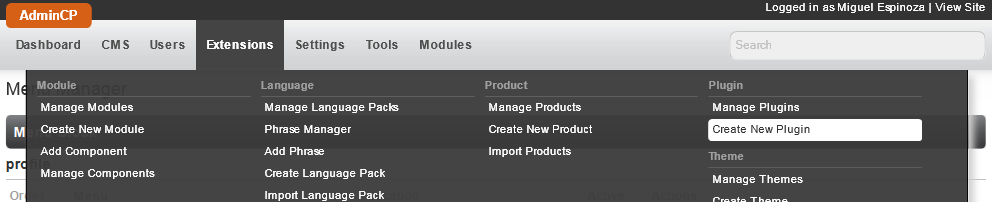
There are two types of plug-ins in Phpfox, the flat-file ones and the database added ones. Please note that I am not talking about "Plug-in Hooks". The database added ones are the ones you create through the AdminCP, you can disable these from the AdminCP and tie them to a product and module so when you disable either of them the plug-in is also disabled:
The second type of plugins are flat files, there are no control over these from the AdminCP and should in general be avoided. To add this sort of plug-in you would only need to create a php file in the plugins folder of your module, the file name is the hook that will trigger this plug-in, for example: /module/mymodule/include/plugin/url_getdomain_1.php the contents of the php file must still include the php opening and closing tags (<?php and ?>)